


On paper, the OXS Thunder Duo X sounds too good to be true. At a glance, I thought it might be a little gimmicky. After I plugged the system in and fired up Modern Warfare 3, I finished the campaign with some thoughts …
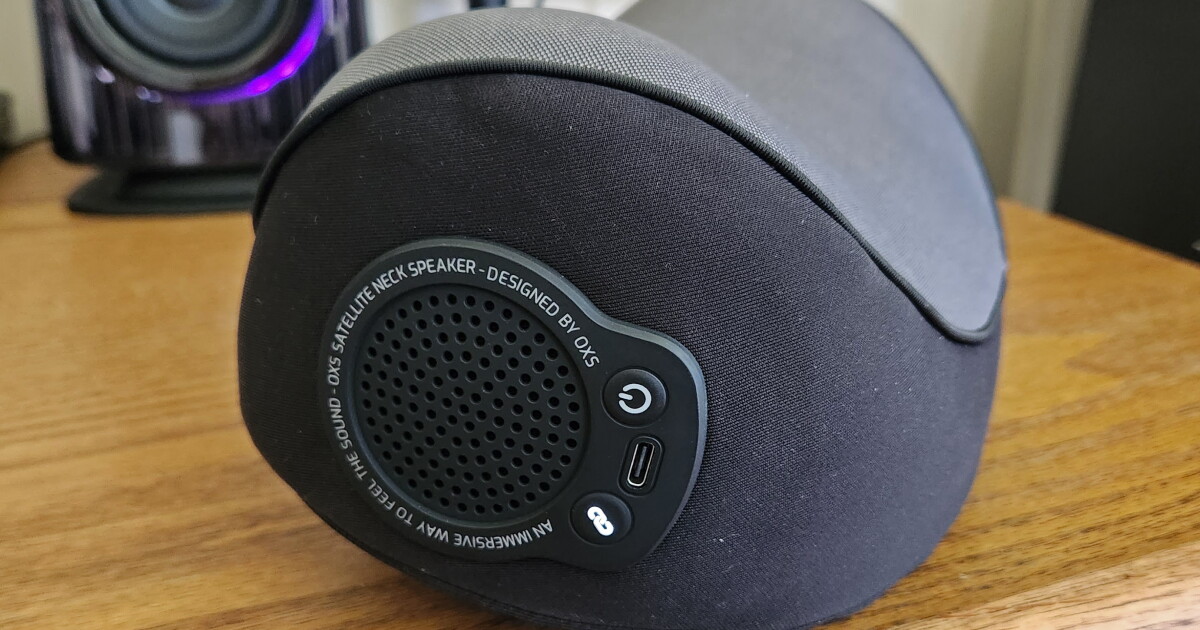
The neck pillow speaker, which runs on its own 5.8-GHz low-latency channel wirelessly connected to a dongle on the back of the speaker, is a great addition, really giving you a sense of rear-channel sound. But, it’s designed to work specifically with gaming chairs. If you have a regular ol’ desk chair, good luck getting it on there, or at least getting it where you need it. Same deal if you’re a couch dweller. And if you’re using the speakers to chill and watch Netflix with someone, you can’t really share the rear channels with anyone else. And no, you can’t wear it on your neck if it doesn’t strap to your chair.
If you do happen to have the perfect chair for it, you’ll get about eight hours of awesome before the battery dies. OXS claims up to 12 hours, but I haven’t had that experience. The fabric is silky-soft and the pillow is cushy. The rear channel speakers behind your head aren’t particularly loud, but they’re just right. On the plus side, you can charge it while using it, so you’ll never have to suffer 5.1.2 Dolby Atmos downtime when your fireteam turns a Vault of Glass raid into a 10-hour marathon.
JS @ New Atlas
I used the speakers for a few weeks before I installed the app on my PC. Normally, I’m not an app-installer if I don’t have to be, but the speakers kept auto-shutting down on me if I walked away from my computer for 10–15 minutes, and it was driving me crazy. Thankfully, there was an option in the app to disable auto-shutdown mode. There are also a couple of EQ options and about a million RGB options.
By the way, the app only works when you’re connected to your computer via USB-C and it might take you a sec to figure out how to switch languages to something you can read, as the app’s default language is Chinese.
Stats at a glance:
- Dolby Atmos 5.1.2 desktop speaker system
- 130 W RMS total – 110 W mains + 20 W neck speaker
- Main drivers: 2× 3.5-in woofers, 2× tweeters, 2× up-firing Atmos drivers
- Wireless neck speaker: rear/surround channels, ≤20 ms latency
- Inputs: HDMI 2.1, HDMI eARC, USB-C, optical, Bluetooth 5.3
- HDMI passthrough: 4K/120 Hz
- Frequency response: 45 Hz – 20 kHz
- Max volume: 95 dB
- Neck speaker: up to 12 hours

JS @ New Atlas
Normally, I’m not a flashy-flashy-LED-RGB-bro. I tend to disable all of that stuff if/when I can, but honestly, the soft purple light that subtly does things to the beat of the music/gunfire doesn’t bother me one bit from these speakers. I did turn the brightness way down, though. The app and the remote both have the ability to turn it off entirely if you wish.
Speaking of, the remote for the Thunder Duo is a bit funky. While it doesn’t feel flimsy or cheap, the layout leaves pretty much everything to be desired. It’s exactly a zero on the intuitive scale. I have to look at it 100% of the time to figure out where the volume buttons are. It has that same button-layout vibe as those cheap LED strips you bought back in 2015. Though, on the plus side, it has a button for nearly every function, like changing the basic EQ from music to gaming to monitor, changing the colors and patterns of the RGB lights, adjusting the bass and treble levels, and even changing how loud or quiet you want the top drivers to be. And the right speaker itself has touch sensitive buttons on the top to control power, volume, and input, so you don’t always have to rely on the remote.

JS @ New Atlas
Overall, I think these might be my favorite PC speakers I’ve ever used. They’re not my style aesthetically – I prefer plain, executive-type looks – they take up more room on my desk than I’d prefer, I have to switch from my favorite chair to my third-favorite chair to use the neck speaker, and the remote is downright silly … but hawt-diggety-dog, they sound really, really good. I legit prefer the Thunder Duo setup over using headphones.
The bass punches way better than you’d expect from the 3.5-inch woofers. Honestly, just writing the sentence with “3.5-in woofer” makes it sound silly, but I kid you not, they give you 8-inch energy sitting on your desk. And the 20-mm silk-dome tweeters handle the top end unbelievably well for this price range, delivering clear, detailed, and clean highs. Each speaker has a 1.5-inch Atmos up-firing speaker that gives you that full overhead effect. Music or games, they sound super good and add, well, height. That’s where the 5.1.2 comes into play. Atmos isn’t just left/right and front/rear. It’s also height. So just before you get fragged from an airstrike in CoD, you’ll hear it coming from overhead. The one caveat is that Dolby Atmos only works via HDMI/eARC.

JS @ New Atlas
The speakers are LOUD. I’ve not cranked them to 11. Frankly, whether I’m blasting music or the Covenant, about 50% volume is more than enough – and even still, the wife is like, “Why is it so loud!?” Because, dear wife, these bad boys are 110 W RMS and can push 220 W peak.
It comes with all the cables you’d need, including a “special” USB-C cable with ferrite clamps on both ends (nice touch, OXS!), plus an HDMI and optical cable too.

JS @ New Atlas
Now $549 IS a pretty penny – you’re getting into professional JBL 3 Series studio monitor territory at that price – but these sure are great, even without the neck speaker.
Product Page: OXS Thunder Duo X
New Atlas may receive commission if you purchase through our links. This does not affect our reviews as our opinions remain our own.

