


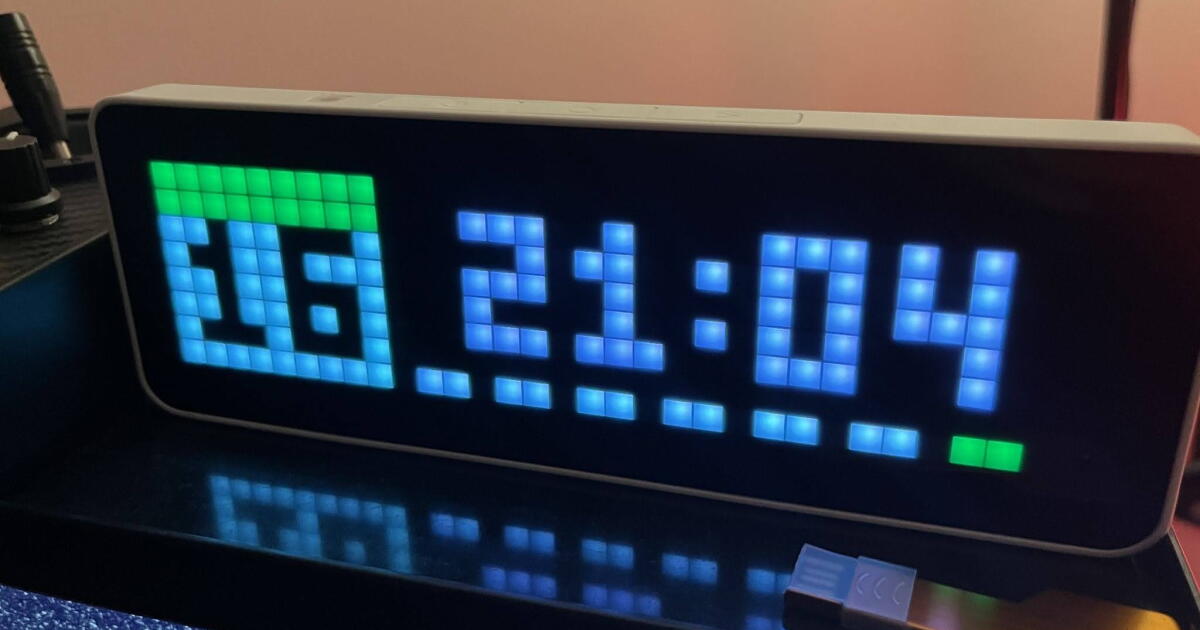
The Ulanzi TC001 is a small Wi-Fi clock built around a 32 x 8 RGB LED matrix. It’s compact, bright and just retro enough to be charming without looking like something dragged out of an arcade cabinet. Out of the box, the appeal is simple. The display is clear enough to read from across a room, small enough to sit unobtrusively on a desk or kitchen bench, and far more interesting than another anonymous black LCD clock.
You can glance across the room and get useful information without opening an app, waking a phone or talking to anything. That’s already quite good fun. It’s also hackable!
It does rather more than tell the time
Before going anywhere near custom firmware, the TC001 is already a surprisingly capable little desk gadget.
Content creators will want one in the back of their shot displaying subscriber numbers, but obvious jobs are also there: time, date and weather, all rendered across its 256 RGB LEDs in chunky, colorful pixels. Brightness can be adjusted automatically and manually, which is handy if you’re wanting one beside the bed, and there are plenty of little animations and display styles to stop it feeling static. It’s endlessly customizable.
There are also some genuinely useful extras. It has a built-in Pomodoro timer for 25-minute work sessions and five-minute breaks, a stopwatch and a simple red-versus-blue scoreboard.
You can upload your own text and pixel artwork too, and this is where the display starts developing some personality. A clock can give way to an animation, icon, message or other little piece of information before eventually rotating back to the time.
There’s a wider ecosystem around it as well. Ulanzi points users towards downloadable display apps and community-created pixel art, so you’re not limited to whatever happens to ship in the box. For something with only 256 pixels to play with, people have found a surprising number of things to put on them.
It even contains a 4,400-mAh battery, officially good for around five hours. In practice, this still feels like a clock you’ll mostly leave connected by USB-C, but the battery means it can be moved around without immediately going blank.
Howard Armitage/New Atlas
I’ve had a great time with this clock, and I’d have been happy with its stock capabilities out of the box. Its ecosystem may be a little rough around the edges, and 8 x 32 can feel limiting, but it’s cheerful, genuinely useful and easy to understand. None of this requires Home Assistant, a server rack or any other form of technological self-torment.
Underneath the friendly little pixel clock, though, the presence of an ESP32 makes things interesting, and Ulanzi has done something rather unusual.
They’ve left the door open.
The other clock hiding inside it
The TC001 has attracted an enthusiastic home-automation following because it can be used with AWTRIX, an open-source firmware and ecosystem designed around small LED matrix displays. That’s where things become very interesting.
Instead of being limited to the manufacturer’s stock features, the display can become an endpoint for Home Assistant, MQTT and custom applications. You can send text, icons, colors, alerts and dynamic information directly to it.
This is definitely optional. If all you need is a colorful little Wi-Fi clock, you can stop here and remain a perfectly well-adjusted human being. But if the phrase “custom firmware” tantalizes your technical tendencies, the TC001 starts to look less like a clock and more like a blank 256-pixel canvas.
My two displays now sit inside a much larger local smart-home project. The kitchen clock shows information relevant to the kitchen, while the office display can show information generated elsewhere in the house.
The most useful example turned out to be something Alexa had previously done very well. Timers.
“Hey Yaffle, start a pasta timer”
If you’ve been following my adventures, you’ll know that Yaffle, my locally hosted smart home assistant, could already control lights and devices, but it lacked one killer feature that meant I still needed Alexa: asking for a timer and being able to glance across the room to see how long remained. That combination of voice control and visual display has been a tricky combination to replace locally. Until now. I taught the clocks to do it.
Now I can say, “Hey Yaffle, start a six-minute pasta timer,” and the kitchen clock immediately changes to show the timer name and countdown. The system knows from which Yaffle the request came, and responds accordingly.

Howard Armitage/New Atlas
The timer finishes READY for 10 seconds, clears itself and returns to its normal display. Vibe coding feels like cheating!
Getting that apparently trivial behavior working involved Home Assistant, MQTT, custom software, and more Claude, Codex and ChatGPT tokens than one should reasonably associate with boiling pasta.
At some point I realized that I was effectively the API connecting all three of them.
That’s probably a story for another day, meanwhile, now Home Assistant has a hold of these things, I may be some time.
Product page: Ulanzi TC001 Smart Pixel Clock 2882
New Atlas may receive commission if you purchase through our links.

