


I’ve used a million printers over my decades of being a computer nerd and a professional photographer. I used to print professional 11 x 14 matte images like they were going out of style on the ol’ Canon Pixma Pro9000. Less so these days with e-ink frames and everything being so digital now. But the Pixcut S1 ain’t that kind of printer … this thing can print and cut stickers! And who doesn’t love stickers?
It’s really quite simple:
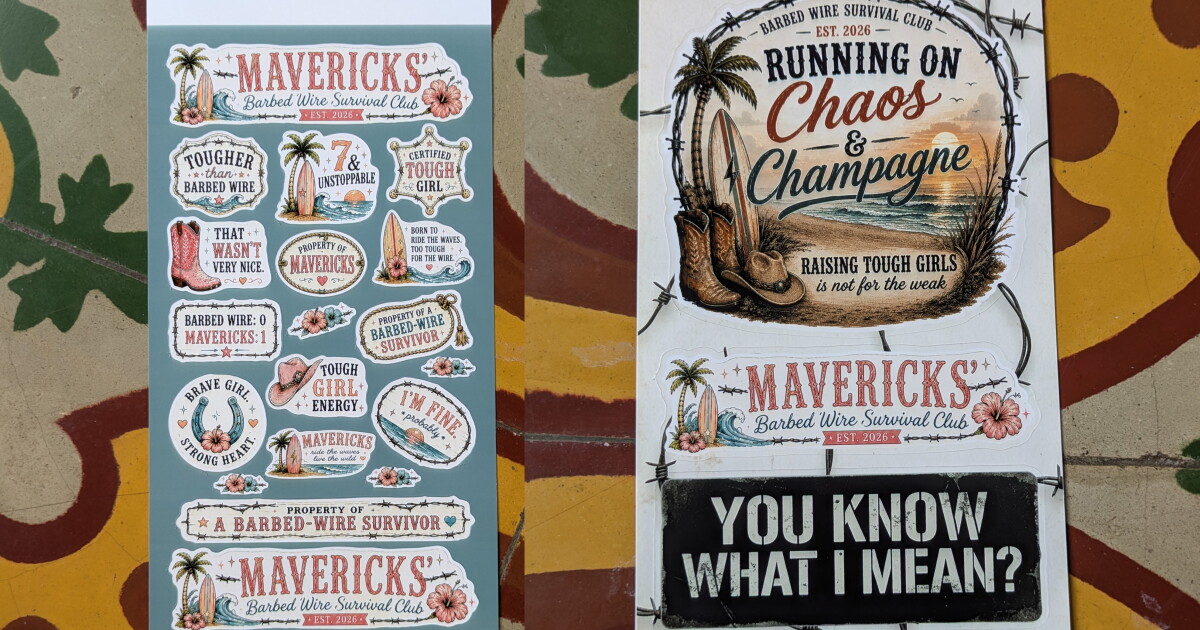
The wife was the first to get her hands on it. I sat idly by while she put it all together, not that there was much to actually do. It came with an “ink” cartridge, an 18-pack of 4 x 7 sticker paper, and an 18-pack of 4 x 6 photo paper. Two minutes later, she had the app downloaded and was already creating. I emailed her a graphic that I wanted printed as stickers, and she used one of the existing templates … and that was the first two sheets of stickers.
JS @ New Atlas
Afterwards, she designed up some “get well soon” type stickers for her friend’s daughter, who had just had a run-in with a barbed-wired fence (and lost), and printed those out too.
It’s pretty neat, actually, how it uses AI to create a border around the sticker to “kiss cut.” Meaning, it has a blade inside the machine that just barely cuts through the sticker surface sheet without going through the entire paper, leaving you with a gang of die-cut-like stickers on the 4 x 7 sheet as soon as it’s done printing – without ever having to touch the machine. Try doing that with a Cricut.
The Pixcut S1 zoops the paper in and out, one color layer at a time. Sort of like CMYK, but more like a YMC-plus-a-sealant-layer to make your prints waterproof, UV resistant, and scratch-resistant. And I put “ink” in parentheses earlier because it’s not traditional liquid ink – it’s actually a 4-layer printing dye-sublimation thermal transfer. So the little zip zip of the print head inside is actually heating up the dye ribbon in the cartridge and transferring over a layer of color at a time. And it’s pretty fast! Less than a minute for a photo, and right around two or three minutes for a full sheet of cut stickers.

JS @ New Atlas
Liene says you’ll get about 36 sheets – stickers or photos, makes no difference – per ink cartridge. Liene sells bundled replacements when it’s time to restock: 72 sheets of 4 x 7 sticker paper and two ink cartridge refills for $43, or 72 sheets of 4 x 6 photo paper and two ink refills for $34 over on Amazon.
Stats at a glance:
- Print type: 4-layer dye-sublimation thermal transfer
- Resolution: 300 x 300 dpi
- Photo size: 4 x 6 in
- Sticker size: 4 x 7 in
- Print speed: ~59 seconds per photo
- Cutting: Built-in contour cutter, up to 2 ips
- Connectivity: Bluetooth 5.0; Android/iOS and kinda PC app-ish
- Capacity: 36 sheets / 36 prints per ribbon cartridge
- Size: 11.1 x 7.7 x 4.1 in (281 x 196 x 104.5 mm)
- Weight: 6.4 lb (2.9 kg)
A rep for Liene had emailed me saying that there is a PC app for the Pixcut S1. I’m personally not a fan of using my phone for tasks that I can accomplish significantly faster, more efficiently, and with higher quality by jumping on my computer … so I downloaded the app, installed it, plugged the printer in via USB-C, and instantly realized that the app was incomplete, like Liene released unfinished software. I wanted to print a photo, but had no options for 4 x 6 photo paper. Turns out that yes, the PC app isn’t fully built yet.
So to my phone I went! I grabbed the Android version, and Bluetooth pairing to the printer was a snap. The app is a little cheesy with a million already made AI and community suggestions right in your face, but there’s a big, fat “CANVAS” button right there so you can skip all that nonsense and get right to making what you want. It’s really easy and intuitive. It took me all of 30 seconds before I was printing my first photo.

JS @ New Atlas
I printed a few high-quality photos that I’d shot with my Canon DSLR (on L glass, of course!), and the finished product was pretty solid. It prints at 300 dpi, but it’s not like an inkjet printer, where it makes tiny dots to form a picture. This is more of a continuous tone, so the 300 dpi looks much sharper than you’d expect.
I printed three photos back to back to back. The second one came out of the printer damaged, with a big scratch on it. Why? I don’t know. I looked in the printer and at the rollers afterwards and saw nothing amiss. A total of three sticker sheets and four photos were printed, and that was the only one with any type of blemish/damage.
The photo paper is perforated on either end, and when I saw it, I groaned to myself, thinking about the soft, feathered edges, or maybe even tears while trying to pull off the edges of the sheet. Much to my surprise, it’s more like flex-snap perforation. Bend it once, it cracks. Bend it the other way, and it snaps off cleanly. Definitely high praise for whoever thought of that.
I did the math on the economics of this thing, and if you’re using it primarily to punch out photos left and right for your scrapbook, you’re much better off having your local CVS or Walmart or something run out a ton of 4 x 6 photos. The Pixcut will cost you about 47₵ each when it boils down to it. Walmart will do it for 18₵ a pop.

JS @ New Atlas
On the other hand, the breakdown is a bit better if you’re printing stickers. Obviously, that depends on the size of the stickers you’re doing … one per page is about 60₵, but if you’re ganging up five or more stickers per sheet, your cost per sticker is going to be pretty good. Especially for a low-volume, fully custom sticker run.
For example, if you want 50 custom 1×1 stickers from StickerMule, it’s going to cost you $47. That’s about 94₵ each. With the Pixcut, taking into consideration ink and three sheets of sticker paper you’ll use for the same task, it’s going to cost you about $1.90 in all … or about 4₵ each. The math checks out.
The cutting blade is replaceable too. Liene says it’s good for about 700 sheets before it’s time for a freshie at $13. Not bad.
And the Pixcut S1 is small – about the size of an average woman’s shoebox – so it’s not really in the way of anything (unless, of course, you have 50 pairs of said shoeboxes). While the paper tray stores inside the machine (kind of where you’d expect a paper tray to live and work), when you want to print with it, you have to remove it from that storage compartment and sort of jab it into the feeder at the back … and it sticks way out, so you’ll need a fair bit of clearance behind the printer when you use it. That part is a bit annoying. C’est la vie.
All in all, this thing is pretty cool, and I’ll definitely be using it for my own little projects around the house and with the kiddos. Probably make stickers for our eldest child’s class or something. Lots of fun to be had making stickers, that’s for sure! And if you’re the Etsy type, I imagine this $280 printer + starter kit will pay for itself in no time.
New Atlas may receive commission if you purchase through our links. This does not affect our reviews as our opinions remain our own.

