


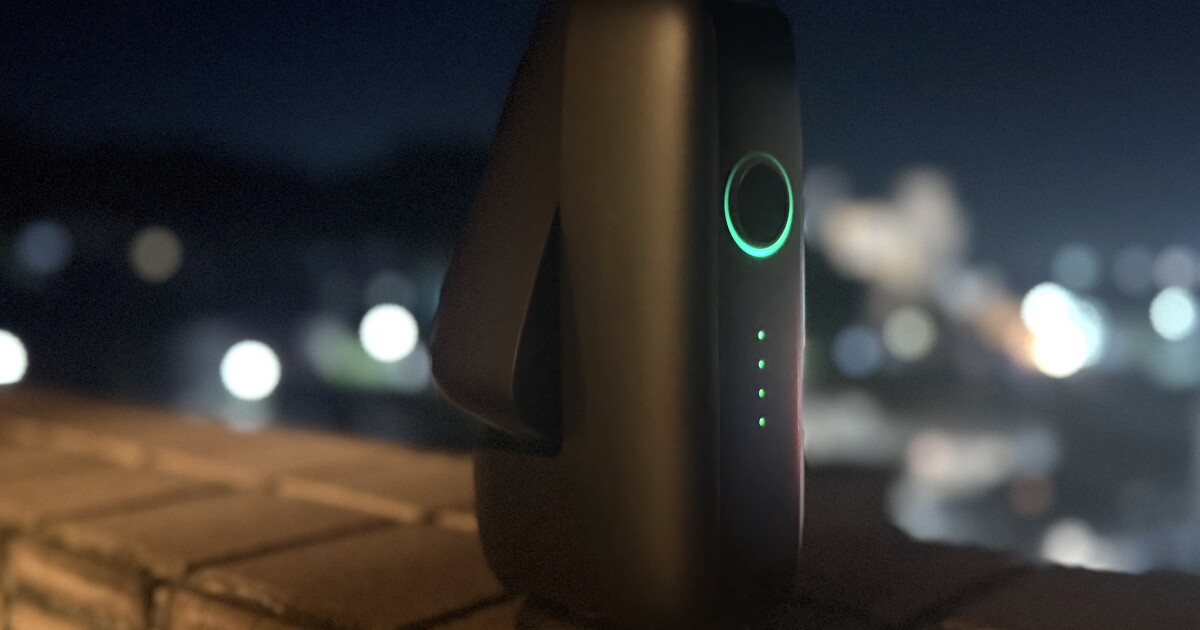
Smart technology is revolutionizing how we see and capture the world around us, as well as how we peer into the universe – without needing to be an experienced stargazer to do so.
We recently previewed the Draco from DwarfLab, which aims to meet somewhere in the middle of luxury smart scopes and compact – and more affordable, more entry-level – gadgets. We also looked at the Dwarf 3 last year.
The Mini is much cheaper, and pretty mighty given its weight and size. As the image below shows, its 100.38 x 183.61 x 60.70-mm (3.95 x 7.23 x 2.39 in) body is smaller in length and width than an average paperback novel, and only a little thicker.
New Atlas
Much like my Thermal Master experience, I’ve had issues with outdoors technology lately – no clear skies at night for two months, a summer that’s been ruthlessly hot every single day with no respite, and rain. Lots of it. On the other side of the world, when I first unboxed the Mini, where I was under a starry sky, I had other – quite small-town Australia-specific – issues, including the local kangaroos crowding around me – when I could get the gadget out from beneath trees to find a patch of clear sky.
And when I’d all but given up, I finally had – for a couple of hours at least – a clear-ish sky but only a balcony to work with and lots of light interference from fishing boats coming back to port and the streets below. I half expected an earthquake to knock the thing clear off the balcony edge when I left it there to do its thing.
The Mini is indeed a sleek unit, weighing just 840 g (1.85 lb) and, like I said, is so surprisingly small for what it does. This is why I have been carrying it from country to country in the hope of grabbing the perfect shots like some I’ve seen from actual users online through the Dwarflab social media portal.

New Atlas
Now, this unit is not super powerful – but it’s a surprise package that just takes a bit of time and patience to understand how to make it work for you. But it’s also really easy to set up and connect to your phone. While the accompanying app, the standard Dwarf software if you’ve owned any other products, takes a bit of experimenting with, the company has struck a sweet spot between manual flexibility for more experienced folk and point-and-shoot beginner-friendly functions for those new to the game.
In the image below, you’ll also see the lens it comes with to allow for shooting images of the Sun without damaging its night-sky mechanics.

New Atlas
After setup, you also don’t need to be constantly on Wi-Fi, so it’s an ideal little device to take out on camping trips or hikes. While it doesn’t come with a tripod, a standard 1/4-in mounting thread can be found on its base and works just fine with generic models that fit this size.
The company says you’ll get up to four hours of shooting out of the Mini’s 7,000-mAh battery (USB-C charged), and I think it’s pretty close. I was playing around with it for nearly two hours one night and around 70% charge remained at the end – however, there was a good 30 minutes of downtime while I tried to figure some things out. I did not figure those things out. The app has a built-in AI assistant but I didn’t find it super helpful; a bit laggy, lots of text and a little overwhelming for beginners asking for help. But it’s also not obnoxiously present and prompting you to engage, which is a really nice change and much appreciated.

New Atlas
It sports a sensitive Sony IMX 662 sensor, with 65 GB of built-in storage and supports JPG, FITS and TIFF image formats. Video output is MP4 but I haven’t been able to do much with this given my phone’s limited storage and some issues with not having home Wi-Fi. The aperture is 30 mm for telephoto and 3.4 mm for wide-angle shooting, and the Mini’s autofocus is pretty good. You can toggle the automatic functions off for more control, but if you’re a beginner I’d recommend leaving things as they are.
At 2.07 MP, and 150-mm focal length, you already know you’re not going to get the kind of images regularly seen on NASA’s online portals – even when, for instance, 80 individual captures are stacked together. So, if you want to capture planets, in particular, this model is not for you. To make up for its lens shortcomings, compared to more expensive and larger models, the Mini takes a lot of images in the one position. As such, and if you’re patient enough, you can leave it alone for a while and end up with some really beautiful shots of things like nebulae, star clusters, the Moon, star trails and some interesting wide-field sky imagery.
A “mega stack” function also lets you combine snaps taken over different nights, which makes it a rather fun tool to experiment with. And from people’s images published on the company’s image-sharing platform, I’d say some people are getting real bang for their buck out of this little model.

New Atlas
One thing I did spend a lot of time on, and neither the built-in AI or what I could research could fix it, was the issue of dark frames required for specific targets. I’ve since found out it’s not just a matter of adding the right “darks” to the menu for tele/wide settings, but involves precise parameters that aren’t given to you. Essentially, dark frames help remove noise to capture better images, but each time I found an object that was visible I was instructed via the app that I didn’t have the suitable dark frames. Nor did I know what darks I was required to create.
More experienced stargazers might have no issue with this, but it feels like something that could be automated through the app to take out the users’ guesswork, particularly when they don’t really know what they’re doing and why a recommended, found and tracking object couldn’t be captured. (That said, there is a button to capture it anyway, but it’d be handy to know what you could do to program the best settings for good photos.)
Basically, darks need to match parameters such as exposure time, gain and resolution, yet the Mini already knows the settings for the imaging session and can determine that the library of darks in the app don’t match what’s required. So I feel it’d be far more beginner-friendly if it simply said what was required and guided the user through creating it. Because creating them is actually easy; knowing what you need to create … less so.
I was somewhat happy to learn in my research that I wasn’t the only one who found this particular issue confusing, and might be something that DwarfLab can work with in the future. Because otherwise its level of automation and app usability is really good.
However, it does have some impressive app functions, like the atlas view that lets you use your phone to explore what’s above you. And you can either target a specific spot or use the recommended list. The Mini will then swivel both its body above its base and the arm of the lens to track chosen target.
Just bear in mind it’s less “point and shoot” and more “lock in for a while” because you really need to stack its captures – as many as you can – to produce the kind of images you’ll get from smart scopes at least five times its price.

New Atlas
A couple of small but important points: While your phone is connected to the Mini’s built-in Wi-Fi system, you can close the app and go about other business while it’s shooting, without this interrupting the device. This is very handy if you’re aiming for a two-hour shoot and want to just set it up and let it get to work without babysitting it.
It’s also worth noting that the Mini is surprisingly mobile. Its base can rotate continuously through 360 degrees, while the telescope arm has 225 degrees of movement. And you don’t have to touch the machinery to either get it to lock onto something or try to find what you want it to. Though, ideally, you’d want a clear sky with few obstructions – and not a balcony like mine with a limited window of space and a night sky that becomes increasingly hazy or cloudy as the hours pass.
Overall, the Mini isn’t trying to compete with models that cost thousands of dollars, but is hands down the most portable star-gazing device on the market and what it lacks it makes up for in other ways – like its image-stacking capabilities. It’ll require patience and a bit of time to get the feel of the app and what its capable of, and I have a feeling I’ve only scratched the surface on the Mini (figuratively, not literally).
And it’s one reason I’ll continue to pack it in my cabin baggage wherever I go, because given the right environment, I am excited to see what its real potential is.

New Atlas
The Mini is available from the DwarfLab site for US$419, and comes with a two-year warranty and lifetime customer support. Which perhaps I should have leaned on more, in hindsight …
Also check out the DwarfLab site for full specifications.
Source: DwarfLab

