


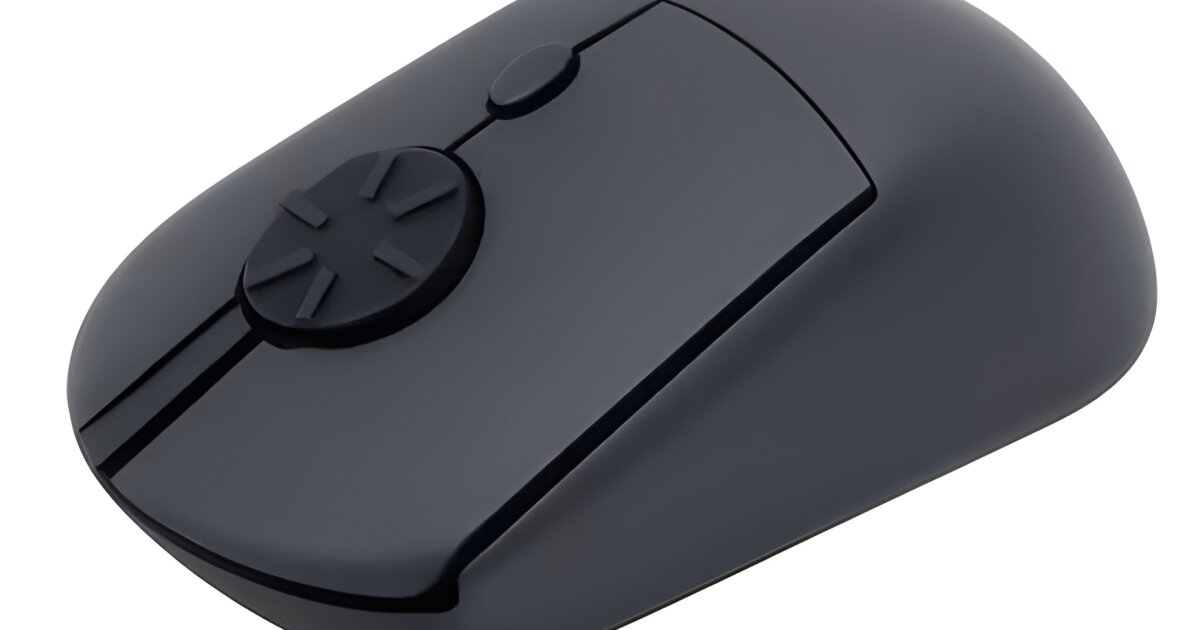
Finger joint strains are the bane of long hours spent daily on the computer, which is what led Melvin Wong, founder and engineer at Airra Labs, to build a better computer mouse – the Rotary Mouse, which is currently on Kickstarter.
The action of continuously flicking a typical mouse wheel up and down can be slow and tedious as well difficult to control, even with infinite scroll wheels. These issues took a toll on Wong’s fingers, leading to discomfort and pain while scrolling.
He responded by coming up with a mouse with a rotary wheel that scrolls the display up clockwise and scrolls it down counterclockwise. It is controlled smoothly with continuous motion that reportedly expands ROM (range of motion) to reduce finger strain and spread movement naturally.
Airra Labs
The user turns the rotary wheel like a dial and the screen moves fluidly with uninterrupted real-time control over pace and direction. Included with the left/right buttons is a middle button located in the center of the rotary wheel that can be activated by pressing to generate a click.
Compared to infinite scrolling wheels that spin freely but are harder to control, the rotary wheel scrolls with small precise silent tactile clicks that can be controlled pixel by pixel even while quickly scrolling.
The Rotary Mouse is suited for user tasks that require a lot of scrolling such as reading websites, writing lengthy documents, skimming spreadsheets, coding, or large amounts of video editing.

Airra Labs
In addition to its faster rotary scrolling – which is reported to be 2.5x faster than a regular mouse – the Rotary Mouse also supports standard scrolling by turning the rotary wheel in a half-circular rotation via vertical flicking. It connects wirelessly via USB.
Video editors can use the Rotary Mouse as an inexpensive alternative jog/shuttle controller to seamlessly edit timelines, view footage frame-by-frame, or zoom in and out with precise clicks in DaVinci Resolve, Adobe Premiere Pro and Final Cut Pro.
Reverse scrolling is also possible by changing the mouse settings in Windows 10/11 and system preferences in macOS but by default, the mouse already scrolls down when rotated counterclockwise and vice versa similar to Windows-style scrolling. Support for Linux and Android are also included.

Airra Labs
Consistent stable tracking without excessive power consumption is due to the mouse operating at the standard 125Hz polling rate (with 2.4 GHz wireless connectivity) referring to the number of times it communicates its location to the computer.
The mouse can also function as a gaming steering wheel alternative to large wheels or inaccurate keyboards, and the sensitivity setting can be adjusted via AutoHotKey to preferred comfort driving levels. The DPI sensitivity (dots per inch units of mouse movements) ranges over 800/1200/1800 DPI.
The Rotary Mouse (with one AAA alkaline battery included) is available in four models, and is set to ship in November if all funding goals are met and production goes as planned. For the Kickstarter campaign matte black is the only color offered, but other colors and sizes are planned in the future.
The Standard mouse goes for a pledge of US$89 (planned retail: $139), while the Vertical model is priced at $109 (retail $159). There’s also an analog-style SIM Edition for driving control ($89 pledge, $149 retail), and a Creator Edition optimized for video editing, priced the same as the SIM Edition.
Rotary Mouse: The Mouse Reinvented for Scrolling
Sources: Kickstarter, Rotary Mouse

