


There is a particular sort of helplessness that comes from knowing exactly how to fix a computer while being hundreds of miles away from it. If Grandma, the boss or a partner needs IT support RIGHT NOW and you’re not there, well, you know.
Remote desktop software such as TeamViewer, VNC or RustDesk is wonderful while the remote computer is awake, connected and running an operating system. But if Windows has crashed, an update has gone spectacularly wrong, the machine won’t boot, or you need to change something in the BIOS, your beautifully configured remote desktop connection disappears along with everything else.
That’s where a KVM-over-IP comes in.
KVM stands for keyboard, video and mouse. One of these little boxes connects directly to a computer’s video output and USB port, then lets you see the screen and operate it remotely through a web browser as if you were sitting in front of it. The computer has no idea that you’re in a hotel room, another country or, indeed, sitting in the smallest room of the house.
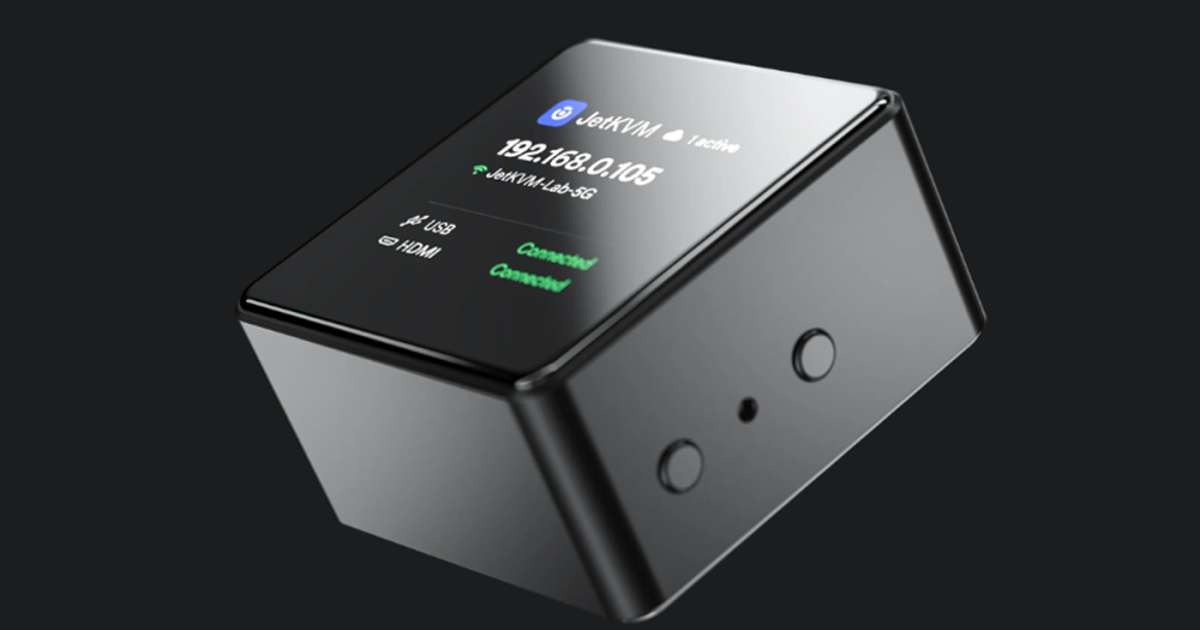
Traditionally this has been fairly specialist server-room territory. JetKVM has already done a good job of making it cheaper and friendlier, but this new JetKVM Mini W takes the idea somewhere more interesting, at US$42, putting one permanently on an important PC no longer seems extravagant.
I already have a couple of earlier JetKVMs, and they have genuinely saved my ass more than once.
The key distinction from normal remote desktop software is that JetKVM doesn’t depend on Windows. If Windows crashes, JetKVM keeps running. If the machine doesn’t boot, JetKVM still shows you the boot screen. Need the BIOS? Press Del and there it is. You can even mount installation or recovery media and boot the remote machine from it – I skipped through that one with a short sentence, but remote install is extremely useful!
That changes the kind of problem remote access can solve.
Imagine you’re away at a conference and discover the master spreadsheet you need is sitting on your office PC. JetKVM can send a wake-up command to a suitably configured machine, even remotely. You can log in, find the file and send it to yourself.
Or perhaps an update has left the family PC unable to boot and you’ve received the inevitable phone call. Instead of trying to conduct BIOS troubleshooting through somebody else’s phone camera – yeah, let’s not do that again – you can see and control the machine yourself.
That’s the bit that turns this from niche server hardware into something a much wider group of people might genuinely use.
JetKVM
Smaller, cheaper and now wireless
JetKVM Mini will come in two versions. The $39 Mini uses Ethernet, while the $42 Mini W gets dual-band 2.4/5-GHz Wi-Fi. Buy three and the prices fall to $33 and $36 each. Both go on sale October 26.
The Mini W measures just 1.7 x 1.7 x 0.9 in (42 x 42 x 23 mm), roughly matchbox-sized. Setup is handled over Bluetooth, after which it connects to Wi-Fi and uses the same browser interface. You can connect using JetKVM’s cloud service, or keep remote access inside your own VPN such as Tailscale or WireGuard.
That wireless connection is really helpful. Traditional KVMs live happily around racks and network switches. A $42 wireless one can live behind an office PC, under the television, beside a small home server or anywhere else that running another Ethernet cable would be annoying and costly.
Inside is one of my favorite chip families, an Espressif ESP32, specifically the ESP32-P4X. It’s a dual-core 400-MHz RISC-V microcontroller with hardware H.264 encoding, paired with an ESP32-C5 radio. The Mini W captures up to 1080p at 30 fps or 720p at 60 fps and streams it to the browser using WebRTC.
There’s also a microSD slot for virtual media, so recovery and operating-system images can live on the KVM itself – yes, reinstall Windows from afar!
Perhaps more unusually at this price, the firmware is open source, with JetKVM saying its new ESP32 firmware will be available from day one. For a device that effectively gives unrestricted keyboard, mouse and screen access to another computer, that’s important because it means the software can be independently scrutinized rather than simply taken on trust.

JetKVM
It’s also becoming a remote desktop
JetKVM is also adding an optional OS Services component for Windows, macOS and Linux.
With it installed, JetKVM says it will offer software video capture up to 4K/60 fps, a shared clipboard, terminal access and, drum roll please – file transfer. The software communicates with JetKVM over USB, so even the target computer itself doesn’t need network access.
The clever part is that the software remains optional.
While Windows is behaving, you get the handy extras you’d expect from remote-desktop software. If Windows crashes or won’t boot, those extras disappear, but JetKVM itself keeps working because it is still connected directly to the computer’s screen, keyboard and mouse.
You effectively get both systems, with one acting as the safety net for the other.
The KVM escapes the server room
KVM-over-IP sounds desperately niche. Even the name feels as though it belongs three menus deep inside an enterprise IT catalog.
Strip the terminology away, though, and the proposition is simple: this little box lets you sit in front of a computer when you’re not actually sitting in front of it – even when the computer itself is having a very bad day.
Anyone who travels but leaves an important desktop behind has a potential use for it. So does anyone who has become the unofficial technical support department for friends and family. Home-server owners will already understand the attraction, and the pro’s solved this ages ago but spent a lot more than this.
The JetKVM Mini W doesn’t suddenly make KVM-over-IP exciting dinner-party conversation. But at $42 and wireless, it may have made it cheap and simple enough that you no longer need to know what “KVM-over-IP” means before discovering that you want one.
It’s the ultimate remote access solution when the OS is inaccessible. And if you’ve ever tried to talk somebody through a BIOS screen over the phone, $42 suddenly sounds quite reasonable.
The JetKVM Mini W goes on sale October 26 at the company’s website.

