


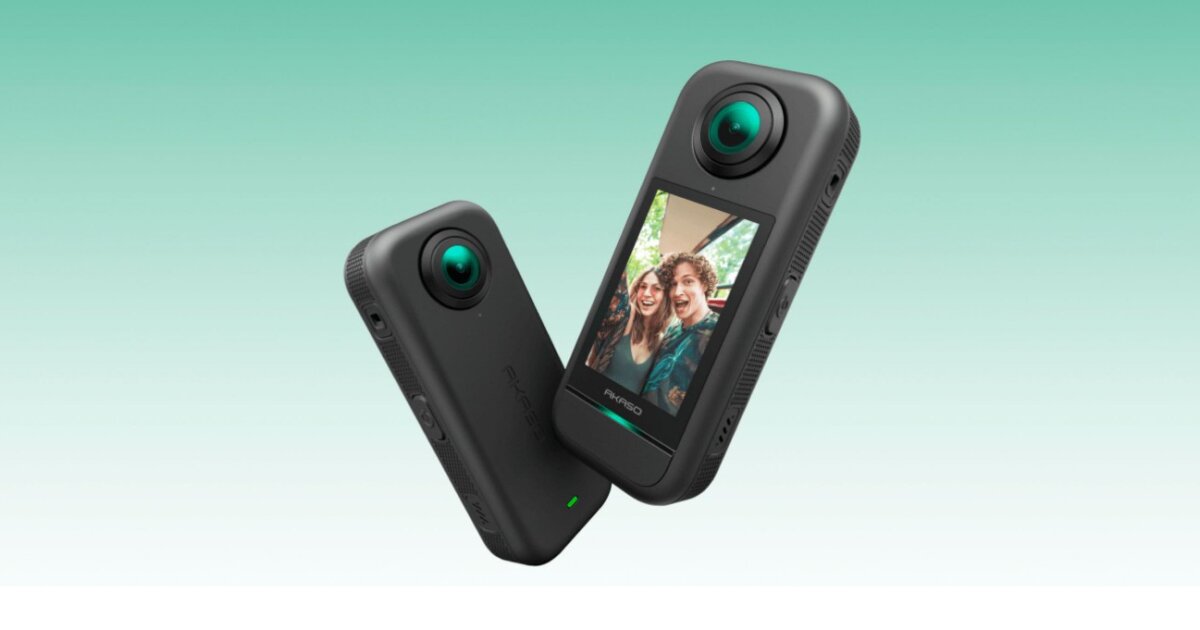
Looking for an action cam that can take fish-eye 360° shots but don’t have a lot of cash to splash? One option is the Akaso 360 Action Camera aimed at the budget-conscious beginner. We took an in-depth look at it to see how it stacks up.
One of the annoying things about action cams is that you often have to cross your fingers when it comes to setting up your shots. Mount one on your helmet, strap one to your chest, or screw one to a selfie stick and you might get footage of a ski run as spectacular as a Hollywood action scene. Or you might get five minutes of the ground, the sky, or something that looks like you put a panicky squirrel in charge of the camera.
This is one of the reasons 360° cameras are so popular. These devices capture stills or video of everything around them. Afterwards, you can use software to select the desired point of view and convert it to a more standard format, so that if all your audience can see is your feet, it’s because you chose that shot.
The sticky bit is that these cameras aren’t cheap, with even inexpensive ones coming in at over US$400. For an experienced action cam enthusiast who has a camera for each sport they indulge in, the investment might be worthwhile, but for the tyro just starting out, budgets matter.
New Altas/David Szondy
That’s where the Akaso 360 comes in. Aimed at beginners, it retails for between US$212.49 and $249.99, depending on the accessories, yet has features and performance that are comparable to more expensive cameras like the Insta360 X series, which was apparently the inspiration for the Akaso 360. In addition, the Akaso 360 puts a lot of emphasis on the “Shoot First, Frame Later” workflow that eliminates a lot of the fiddling while shooting.
What makes the Akaso 360 work is that it has a fisheye lens on both the front and back of the camera, which record two hemispherical images that the Akaso app combines into a single global image.
The whole thing weighs in at 180 g (6.35 oz) and features a 2.29-in (58.17-mm) high-resolution touchscreen for navigation and preview. The whole thing is surprisingly sturdy, though it doesn’t like the wet and isn’t happy with extreme temperatures, so I wouldn’t recommend taking it to the Arctic or a desert plateau in high summer.

Akaso
One strong plus is the standard quarter-inch (6.35-mm) mounting point for the included selfie stick or other attachments. The camera software has a neat feature of automatically editing out the selfie stick if you’re using one, though if you include yourself in the final still or video you can end up with one hand looking like you’re constantly trying to speak Italian.
Another plus is that the Akaso 360 has removable batteries that provide up to 60 minutes of recording time. Two or three batteries are included, depending on the package ordered.
The optics of the Akaso 360 are dual 1/2-inch (12.7-mm) 48-MP CMOS sensors with an f/2.25 aperture. The 5.7K video at 30 fps provides sharp, vibrant results in daylight, and stills are captured at 72 MP. That sounds impressive, especially in a budget camera, but keep in mind that this is 5.7K spread over a global image, so the definition won’t be that high for a particular viewpoint.

New Atlas/David Szondy
Another problem is that while the camera handles bright sunlight very well, it struggles in dim conditions, with shadows losing a lot of detail. This makes the device not very well-suited for indoor use. That’s not much of a problem because the camera performs better in wide-open spaces than closed quarters.
If you download the raw optics from the camera using the microSD card, the results will be a lot of single or double fisheye videos or stills. This means that the Akaso 360 App (Android/iOS) and Akaso 360 Studio (Desktop) are essential to make any practical use of the files. These applications allow basic editing by either downloading files to your desktop or linking the camera directly to your phone.
The apps include a number of templates on the phone, though I was never able to get them to work. Part of the reason for this is that the touchscreen for both the app and the camera can be difficult to navigate. This is more of the problem with the camera because it was hard to see or use the interface in bright sunlight. Fortunately, the Akaso 360 has a multi-function shutter button that not only acts as a shutter release, but can also turn the camera on and off and select recording modes.

Akaso
The most important and useful function of the apps is their ability to let users select key frames, allowing you to decide which points of view end up in the final clip as well as how much of the original view is included. For example, when editing footage shot from a car driving down the road, you can choose the front view, rear view, side view, or even a shot focused on the car itself. The apps can also stabilize footage using various criteria, such as maintaining a level horizon.
In addition, the algorithms not only automatically delete the selfie stick, they can also automatically lock onto a subject and track it, though I didn’t find this feature as consistent as it could have been. They can also overlay the image with telemetry data, including speed and location. That being said, the previews of clips are very slow and jerky on replay and I found that I could only get a real idea of what I had recorded by using a third-party editing application.
The biggest problem is that processing and downloading files from the Akaso 360 is extremely slow, taking over an hour to shift a gallery and about as long to export a single five-minute clip.

New Atlas/David Szondy
Despite some of the quirkiness, the Akaso 360 is well aimed at its niche market. I wouldn’t recommend it for intense jobs like taking selfies from a dirt bike race or alpine snowboarding. And I definitely wouldn’t use it to record yourself being eaten by a shark. However, for the beginner or someone who just wants to set it up on a tripod and record a day in the park playing fetch with the dog, the price tag is definitely appealing.
The other strong selling point is that the inexperienced videographer doesn’t have to fiddle with a load of settings before recording. Just set it to record and deal with where you want the camera to point for the final edit later in post production.
Would we recommend the Akaso 360? It’s not perfect and it could be made a bit less delicate in wet conditions. It also takes a lot of patience to deal with the data bottleneck. That being said, it’s a good introductory action cam for someone who is willing to trade a bit of agro for not having to make an expensive commitment to get started making some genuinely impressive videos that look like they were shot by a floating camera following you wherever you go.
Source: Akaso
New Atlas may receive commission if you purchase through our links

